Picture Grid Engine : Ver1.1
A downloadable Picture Grid Engine for Windows, macOS, Linux, and Android
Picture Grid Engine(ピクチャー・グリッド・エンジン)は、画像や動画を探索可能なゲーム空間へ変換するHTML5ゲームエンジンです。
プログラミングの知識がなくても、画像・動画・音楽・JSONステージデータを用意するだけで、オリジナルの探索ゲームを制作できます。
イラスト、写真、AIアート、動画作品の中を実際に歩き回り、イベントやパズルを配置した独自の作品世界を構築できます。
「あなたの画像の中を歩こう。」
---
## 主な特徴
### 1. 画像をゲーム世界へ変換
任意の画像をゲームステージとして利用できます。
イラスト、写真、AI生成画像、ドット絵、美術作品など、あらゆる画像をそのまま探索可能なフィールドへ変換できます。
プレイヤーは画像内を歩いて、走って、自由に移動できます。
対応形式: PNG、JPG、GIF
サイズ: 16:9の比率を推奨します。
1ステージは以下の2枚の画像で構成されます。
・レイヤー2(表画像)
プレイヤーが最初に見る画像
・レイヤー1(裏画像)
修復によって現れる画像
それぞれにステージ用画像(幅1000px前後を推奨)とサムネイル画像(幅500px前後を推奨)を用意することで、合計4枚の画像で1ステージを構築できます。
グリッド設定:
Picture Grid Engine では、画像を任意のグリッドへ分割して扱います。
グリッド数は自由に設定でき、探索範囲やパズルの難易度に直接影響します。
1×1のシンプルな展示作品から、高密度なパズルステージまで制作できます。
---
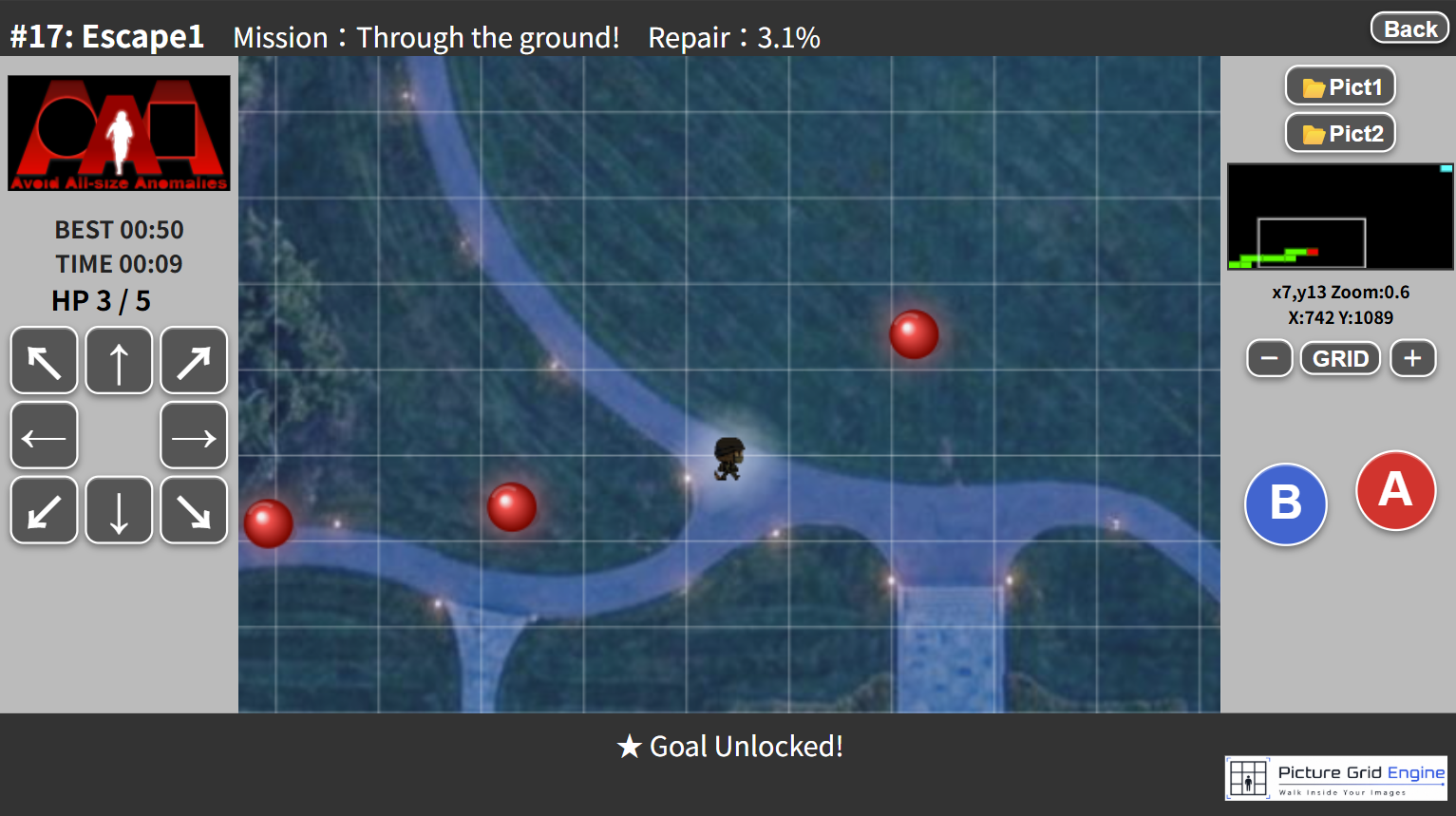
### 2. ペイント修復モード[paint]
黒く覆われた世界を歩き回りながら修復していくモードです。
表のレイヤー2の画像の上をプレイヤーが移動した軌跡に沿って、裏のレイヤー1の画像が復元されます。
修復率に応じてゴールが解放されます。
適している用途:探索ゲーム、ウォーキングシミュレーター、美術館作品、ストーリー重視のゲームなど
---
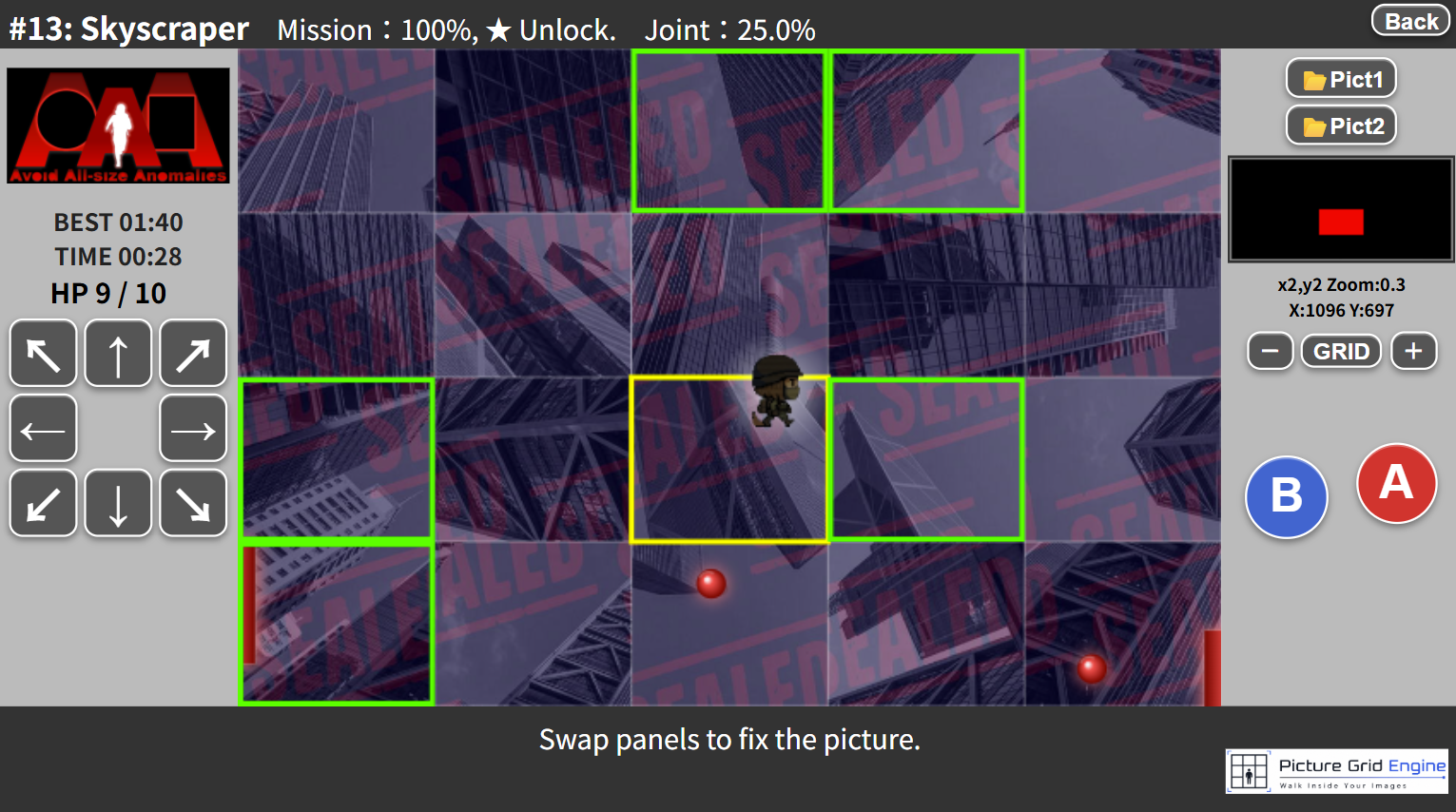
### 3. パネル修復モード[panel]
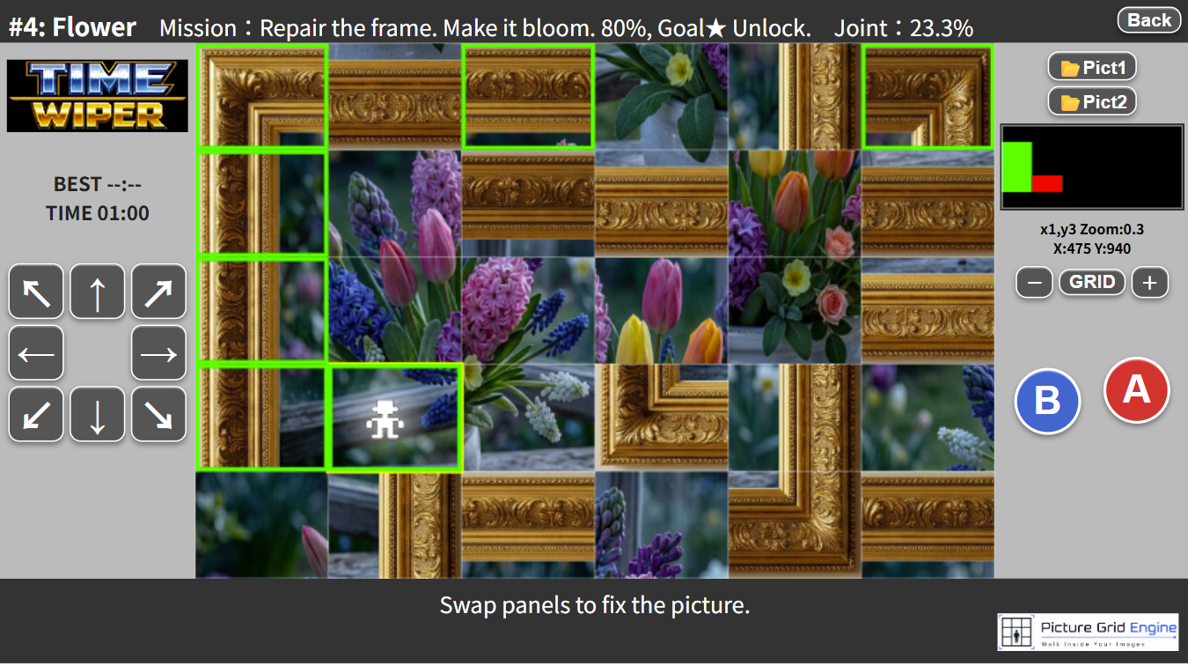
画像を分割・シャッフルし、正しい位置へ並べ替えるモードです。
フィールド内を移動しながら表のレイヤー2のパネルを選択して位置を交換し、画像全体を完成させます。
完成率がリアルタイムで表示されます。
画像が完成すると、裏のレイヤー1の画像が表示されます。
適している用途:ジグソーパズル、スライドパズル、謎解きゲーム、観察力を活かしたゲーム
---
### 4. ハイブリッド修復モード[restoring]
前半をパネル修復モード、後半をペイント修復モードとして組み合わせた二段階ステージです。
まず表のレイヤー2の画像を完成させ、その後、フィールド探索へ移行し、裏のレイヤー1の画像を復元していきます。
適している用途:ストーリー演出、最終ステージ、重要イベント
---
### 5. 動画対応
裏用(レイヤー1)には、画像だけでなく動画も使用可能です。
MP4やWebM形式の動画を利用することで、動く風景やアニメーション背景を探索空間として利用できます。
動画は自動でループ再生されます。
---
### 6. イベントシステム(ペイント修復モード用)
マップ上の任意の位置へ会話・説明・ストーリーイベントを配置できます。
イベントには以下を設定できます。
* タイトル
* メッセージ本文(「\n」でメッセージ内改行可能)
* 通常イベント(▼マーク)
* ゴールイベント(★マーク)
プレイヤーが近づき、Aボタンを押すことでメッセージを表示できます。
※パネル修復モードではイベントシステムは機能しません。
---
### 7. 隠しイベント
ペイント修復モード時、通常イベント(▼マーク)は最初から見えていますが、
これらのイベントは、プレイヤーが周辺を探索すると初めて出現する隠しイベントへ変更できます。
ミニマップや探索システムと組み合わせることで、秘密の発見やストーリー演出を作れます。
---
### 8. ゴール解放システム
ペイント修復モードでは、修復率(画像全体のうち、修復したグリッドの%)に応じてゴール(★マーク)を解放できます。
一定の修復率を満たした後のみ、ステージクリアが可能になります。
---
### 9. ミニマップ
探索状況をリアルタイムで表示します。
未探索エリアと探索済みエリアを視覚的に確認できます。
* 探索済みエリア
* プレイヤー位置
* イベント位置
* ゴール位置
* 現在の視界範囲
を確認できます。
---
### 10. ズーム機能
プレイヤー視点の拡大・縮小に対応しています。
ゲーム中いつでも、画像全体を眺めることも、細部を観察することもできます。
演出としてゲーム開始時のズーム率を設定することもできます。
大規模な風景画像から細かなイラスト作品まで、幅広い素材に対応できます。
---
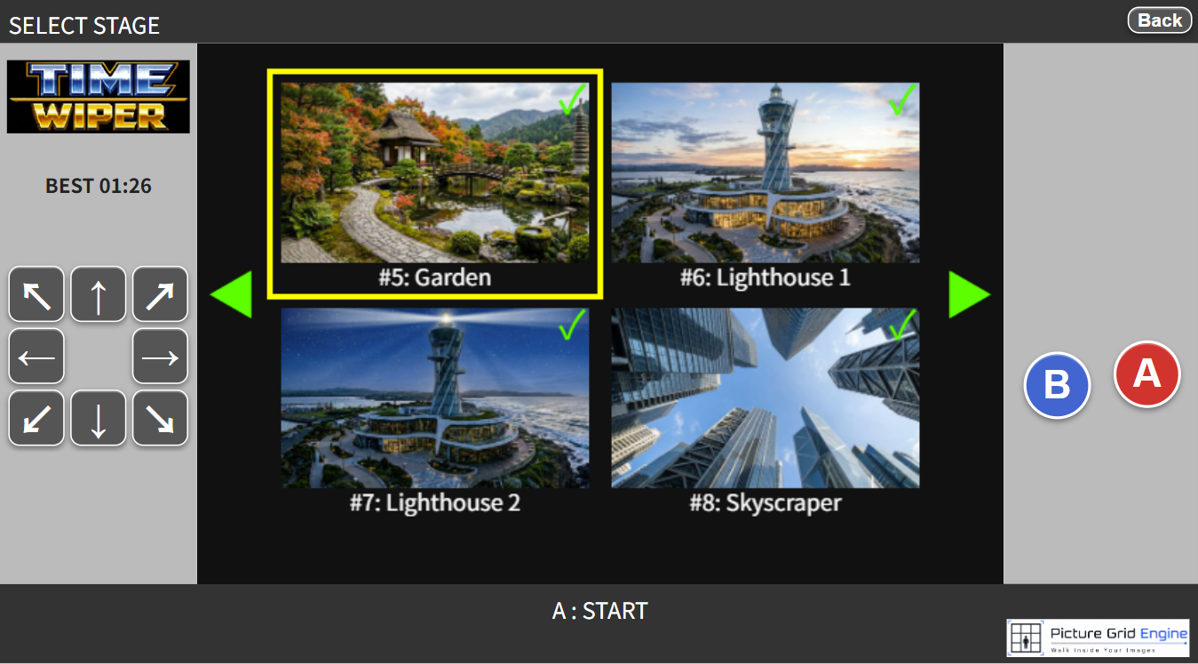
### 11. ステージ選択画面
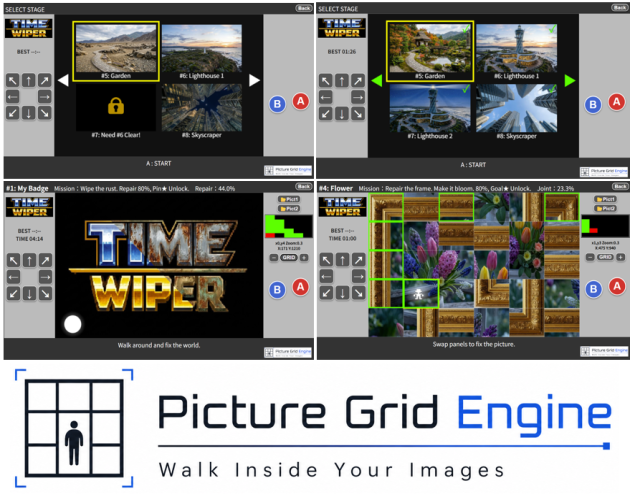
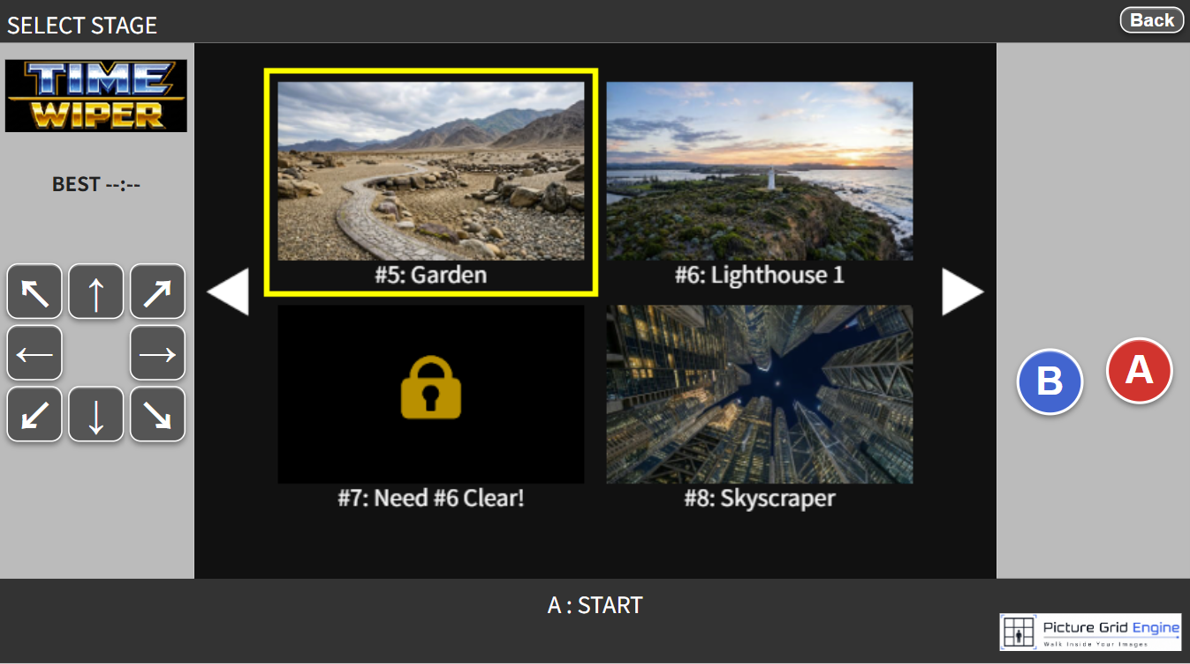
複数のステージを管理できます。
サムネイル表示、ページ送り、ステージロックに対応しています。
クリア状況やベストタイムも自動で記録されます。
---
### 12. ステージロック機能
特定ステージのクリアを解放条件として設定できます。
条件を満たしたステージのみ解放されます。
複数のステージや、ステージの範囲を条件にすることも可能です。
分岐進行やストーリー進行に利用できます。
---
### 13. ステージ別設定
各ステージごとに以下のパラメータを変更できます。
* 移動速度
* ダッシュ速度
* 修復ブラシサイズ
* イベント判定距離
* キャラクターサイズ
* キャラクター表示有無
ステージごとに異なるプレイ感を演出できます。
---
### 14. タイムアタック機能
プレイ時間を自動計測します。
ステージごとのベストタイムを保存できます。
探索ゲームだけでなく、スコアアタックやRTA風の作品制作にも利用できます。
---
### 15. URLセーブ機能
クリア状況やベストタイムをURLへ保存できます。
サーバーやデータベースを利用せずに進行状況を共有できます。
生成されたURLを保存するだけで続きからプレイ可能です。
HTMLファイル単体で公開する作品との相性に優れています。
---
### 16. エンディング演出
ステージクリア時には専用演出を再生できます。
* カメラズームアウト
* グリッド消去
* 完成画像の表示
* テキスト演出
を組み合わせたエンディングシーケンスを実装できます。
---
### 17. BGM・効果音対応
タイトル画面、ステージ、クリア演出ごとにBGMを設定できます。
また、イベントや操作時の効果音にも対応しています。
ハイブリッド修復モードでは、前半のパネル修復モードと後半のペイント修復モードとでBGMを分けることもできます。
状況に応じた音楽演出により、作品世界をより豊かに表現できます。
---
### 18. キーボード・マウス・タッチ対応
以下の入力方式に対応しています。
* キーボード
* マウス
* タッチ操作
* 仮想パッド
PC・スマートフォンの両方でプレイ可能です。
---
### 19. HTML5のみで動作
インストール不要。
ブラウザだけで動作します。
Windows、Mac、Linux、Android、iPhoneなど、HTML5対応環境で利用できます。
---
##Ver1.1(2026年6月19日リリース)の追加機能
---
### 20. 主人公の体力(HP)を追加
主人公に体力(HP:ヒットポイント)を持たせられるようになりました。
JSONステージデータ内に
"maxhp": 5,
"hp": 5,
のように記述することで、ステージごとに任意の初期HP/最大HPを持たせることができ、後述の障害物との接触で減少するようになります。
記述しない場合は、自動的にそれぞれ値は「10」となります。
HPが0になるとゲームオーバーとなり、強制的にステージ選択画面に戻ります。
---
### 21. ズームの固定が可能に
「10.ズーム機能」について、ステージごとにズームの固定が可能になりました。
JSONステージデータ内に
"zoomfix":true,
のように記述することで、
"zoom":0.6,
のように記述しておいたズーム倍率を、そのステージ内では変更不可にできます。
これにより、1枚の絵をワールドマップのように扱い、主人公の移動に伴ってマップをスクロールできる演出が強化できます。
---
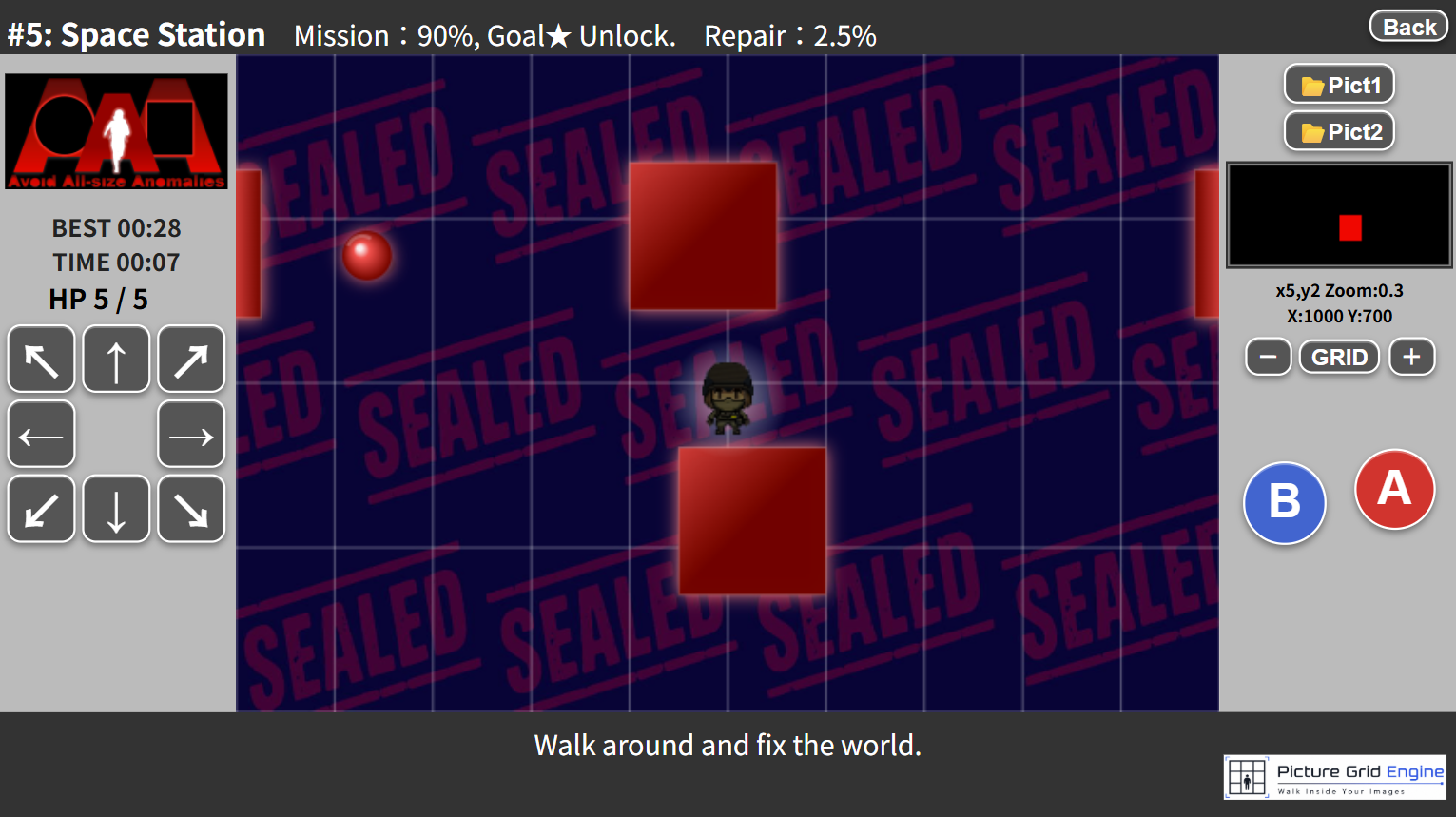
### 22. 障害物(ボール)の設置が可能に
主人公にダメージを与える赤いボールを複数設置することができます。
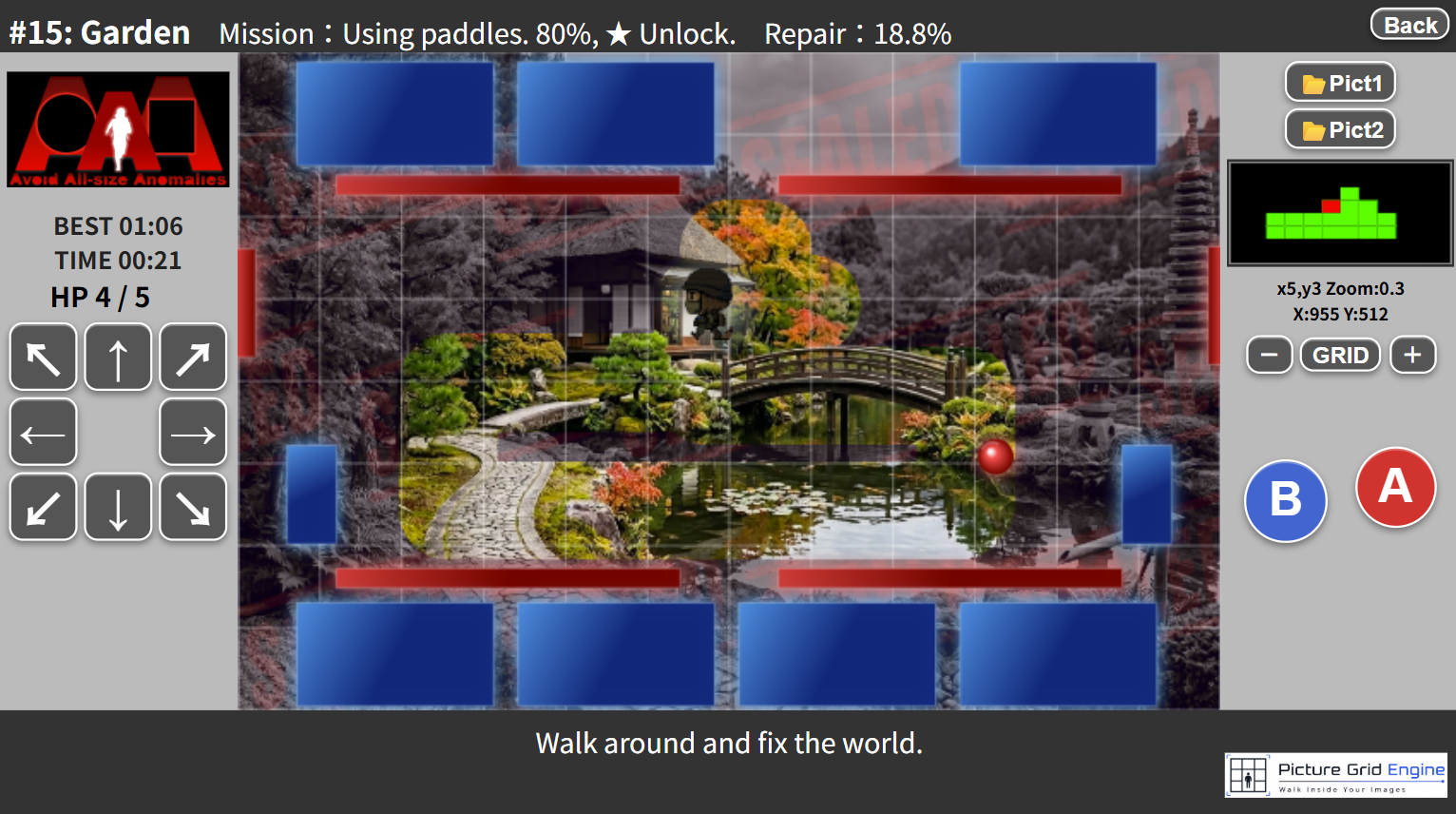
開始位置(x / y)、初期の方向(vx / vy)と速さ、半径(radius)を指定でき、
壁・パドルやボックス・主人公に当たると跳ね返ります。
主人公に当たった場合、主人公のHPが1減ります。
"balls":[
{"x":50,"y":1280,"vx":13,"vy":10,"radius":24},
{"x":1000,"y":669,"vx":2,"vy":1,"radius":12},
{"x":1970,"y":30,"vx":6,"vy":-7,"radius":6}
]
上記のJSONステージデータの場合、
1つ目のボールは画面左下から開始・速い・大きい
2つ目のボールは画面中央から開始・遅い・中くらいの大きさ
3つ目のボールは画面右上から開始・普通の速さ・小さい
となります。
更にボールを追加すれば、弾幕除けステージも作れます。
---
### 23. 障害物(パドル)の設置が可能に
ボールをはじき返す赤いパドル(櫂(かい)・平たい板)を、画面の左端と右端に任意で設置することができます。
左右の表示有無(left / right)、初期の高さ位置(y)、縦の長さ(height)、太さ(width)、速さ(speed)、近くのボールまたは主人公を追跡(ball / player)を指定できます。
主人公に当たった場合、主人公のHPが1減ります。そのままHPが減り続けますので、素早く離れましょう。
"paddles": [
{ "side": "left", "y": 500, "height": 100, "width": 70, "speed": 10, "targetMode": "ball" },
{ "side": "right", "y": 200, "height": 300, "width": 20, "speed": 3, "targetMode": "player" }
],
上記のJSONステージデータの場合、
画面左端のパドルは、近寄ってくるボールを打ち返そうと動きますが、
画面右端のパドルは、主人公の画面内の縦位置に合わせて動きます。
"targetMode": "player"を活用すれば、リモコンのように主人公がパドルを遠隔操作する演出が可能になります。
---
### 24. 障害物(ブロック)の設置が可能に
任意のサイズの四角いブロックを、複数設置することができます。
赤いブロック("breakable": false )は壊れず、ボールを跳ね返します。
青いブロック("breakable": true)はボールが当たると壊れます。
いずれのブロックも、主人公が接触するとHPが1減ります。そのままHPが減り続けますので、素早く離れましょう。
迷路のようにブロックを設置することもできますし、ボールやパドルと組み合わせれば、ブロック崩しゲームのようなステージを作ることもできます。
また、薄い壁のように設置すれば、主人公がHPを削りながら、強引に通り抜けるような使い方も可能です。
"oblongs": [
{ "x": 1500, "y": 350, "width": 300, "height": 40, "breakable": false },
{ "x": 1080, "y": 20, "width": 340, "height": 280, "breakable": true }
]
---
### 25. 主人公のアニメーションがより多彩に
主人公のアニメーションがより多彩になりました。以下のファイル名でキャラ画像を用意いただければ、差し替えが可能です。
画像
// image キャラ画像ON/OFF
const USE_CHARACTER_IMAGE = true;
// キャラ画像サイズ
const CHARACTER_SIZE = 28;
// キャラ横比率(見た目のみ変更。当たり判定には影響しない)
const CHARACTER_WIDTH_RATIO = 1.0;
// キャラ縦比率(見た目のみ変更。当たり判定には影響しない)
const CHARACTER_HEIGHT_RATIO = 1.4;
// ボールに対するキャラの当たり判定範囲 例)0.5:キャラの半分のサイズが当たり領域
const PLAYER_RADIUS_RATIO = 0.8;
---
## 想定用途
Picture Grid Engine は以下のような作品制作を想定しています。
* 探索ゲーム
* アドベンチャーゲーム
* デジタル展示会
* 写真作品集
* 美術作品展示
* 教材コンテンツ
* パズルゲーム
* ストーリーゲーム
* AIアート展示
* 思い出アルバム
* インタラクティブポートフォリオ
例えばこんな使い方も:
レイヤー1とレイヤー2のファイルの中身を敢えて同じ画像にすることで、単純な絵合わせゲームにすることもできます。
グリッド数を敢えて分割せずに縦横1マスに設定し、イベントを設定することで、コメント付きの画像ビューアのようにもできます。
---
## あなたの画像の中を歩こう
Picture Grid Engine はゲームを作るためだけのエンジンではありません。
一枚の画像、一つの映像作品を、探索できる空間へ変えるためのエンジンです。
あなたの作品世界を、プレイヤーが実際に歩き回れる場所へ変えてみてください。
=======================
# Picture Grid Engine Ver 1.1
Picture Grid Engine is an HTML5 game engine that transforms images and videos into explorable game worlds.
Without any programming knowledge, you can create original exploration games simply by preparing images, videos, music, and JSON stage data.
Walk through illustrations, photographs, AI-generated artwork, and video creations as actual game spaces. Place events, puzzles, and story elements to build your own interactive world.
**"Walk inside your images."**
---
# Main Features
## 1. Turn Images into Game Worlds
Any image can be used as a game stage.
Illustrations, photographs, AI-generated images, pixel art, paintings, and other visual works can be transformed directly into explorable fields.
Players can walk, run, and freely move around inside the image.
**Supported formats:** PNG, JPG, GIF
**Recommended aspect ratio:** 16:9
Each stage consists of two images:
**Layer 2 (Front Image)**
The image initially visible to the player.
**Layer 1 (Back Image)**
The image revealed through restoration.
By preparing both stage images (recommended width: around 1000px) and thumbnail images (recommended width: around 500px) for each layer, a complete stage can be created using four images in total.
### Grid System
Picture Grid Engine divides images into customizable grids.
The number of grid cells can be freely adjusted, directly affecting exploration scale and puzzle difficulty.
You can create anything from a simple 1×1 exhibition piece to a highly detailed puzzle stage.
---
## 2. Paint Restoration Mode [paint]
Restore a world covered in darkness by exploring it.
As the player moves across the front Layer 2 image, the hidden Layer 1 image is gradually revealed along the player's path.
The goal becomes available when the required restoration percentage is reached.
**Ideal for:**
* Exploration games
* Walking simulators
* Digital exhibitions
* Story-driven experiences
---
## 3. Panel Restoration Mode [panel]
Divide and shuffle an image, then rearrange the pieces into their correct positions.
Players move around the field, select panels from the front Layer 2 image, and swap their locations to complete the picture.
The completion percentage is displayed in real time.
Once the image is completed, the back Layer 1 image is revealed.
**Ideal for:**
* Jigsaw puzzles
* Sliding puzzles
* Mystery games
* Observation-based gameplay
---
## 4. Hybrid Restoration Mode [restoring]
A two-phase stage that combines Panel Restoration Mode and Paint Restoration Mode.
Players first complete the front Layer 2 image through panel restoration. Afterward, the game transitions into field exploration, where the hidden Layer 1 image is gradually restored.
**Ideal for:**
* Story sequences
* Final stages
* Major events
---
## 5. Video Support
Layer 1 (Back Layer) supports video files in addition to images.
By using MP4 or WebM videos, animated scenery and moving backgrounds can become explorable spaces.
Videos automatically loop during gameplay.
---
## 6. Event System (Paint Restoration Mode)
Conversations, descriptions, and story events can be placed anywhere on the map.
Events support:
* Title
* Message text
* Standard events (▼)
* Goal events (★)
Players can interact with nearby events by pressing the A button.
*Note: The event system is not available in Panel Restoration Mode.*
---
## 7. Hidden Events
In Paint Restoration Mode, standard events (▼) are normally visible from the beginning.
However, events can instead be configured as hidden discoveries that only appear when players explore nearby areas.
Combined with the minimap and exploration systems, this allows for secrets, hidden stories, and discovery-based gameplay.
---
## 8. Goal Unlock System
Goals (★) can be locked behind restoration progress.
The goal becomes available only after the player reaches a specified restoration percentage.
This allows exploration progress to directly influence stage completion.
---
## 9. Minimap
The minimap displays exploration progress in real time.
Players can view:
* Explored areas
* Unexplored areas
* Player position
* Event locations
* Goal location
* Current camera view
---
## 10. Zoom System
The camera can zoom in and out at any time.
Players may either view the entire image or closely inspect small details.
An initial zoom level can also be specified for dramatic presentation.
Suitable for both large landscape images and highly detailed artwork.
---
## 11. Stage Selection Screen
Manage multiple stages from a single project.
Features include:
* Thumbnail display
* Page navigation
* Stage locking
Clear status and best completion times are automatically saved.
---
## 12. Stage Lock System
Stages can be locked behind completion requirements.
Conditions may include:
* Clearing specific stages
* Clearing multiple stages
* Clearing stage ranges
Useful for branching progression and story-driven projects.
---
## 13. Per-Stage Settings
Each stage can customize:
* Movement speed
* Dash speed
* Restoration brush size
* Event interaction distance
* Character size
* Character visibility
This allows every stage to have its own gameplay feel.
---
## 14. Time Attack Support
Play time is automatically recorded.
Best completion times can be saved for each stage.
Suitable not only for exploration games but also for score attack and speedrun-oriented projects.
---
## 15. URL Save System
Clear data and best times can be stored directly within a URL.
Progress can be shared without servers or databases.
Players can continue from where they left off simply by saving the generated URL.
Especially useful for projects distributed as standalone HTML files.
---
## 16. Ending Sequences
Custom ending presentations can be played when a stage is completed.
Available effects include:
* Camera zoom-out
* Grid removal
* Completed image display
* Text presentation
These can be combined to create cinematic ending sequences.
---
## 17. BGM and Sound Effects
Background music can be assigned separately for:
* Title screen
* Individual stages
* Clear sequences
In Hybrid Restoration Mode, different BGMs can be used for the panel phase and the paint phase.
Context-sensitive audio helps enrich the atmosphere of your project.
---
## 18. Keyboard, Mouse, and Touch Support
Supported input methods:
* Keyboard
* Mouse
* Touch controls
* Virtual gamepad
Playable on both desktop and mobile devices.
---
## 19. Pure HTML5
No installation required.
Runs directly in a web browser.
Compatible with Windows, Mac, Linux, Android, iPhone, and other HTML5-capable environments.
---
## New Features in Ver 1.1 (Released June 19, 2026)
---
### 20. Player Health (HP)
The player character can now have Health Points (HP).
By adding the following values to the JSON stage data:
"maxhp": 5,
"hp": 5
you can define custom maximum HP and starting HP for each stage. HP is reduced when the player comes into contact with hazards described below.
If these values are omitted, both default to 10.
When HP reaches 0, the player receives a Game Over and is automatically returned to the stage selection screen.
---
### 21. Zoom Lock Support
The Zoom System described in Section 10 can now be locked on a per-stage basis.
By adding:
"zoomfix": true
to the JSON stage data, the zoom level specified by:
"zoom": 0.6
can no longer be changed during gameplay.
This is useful when treating a single image as a large world map, allowing the screen to scroll as the player moves while maintaining a fixed camera scale.
---
### 22. Hazard Objects: Balls
Multiple damaging ball hazards can now be placed within a stage.
Each ball supports:
Starting position (x, y)
Initial velocity (vx, vy)
Movement speed
Radius (radius)
Balls bounce off walls, paddles, blocks, and the player.
When a ball hits the player, the player's HP decreases by 1.
Example:
"balls":[
{"x":50,"y":1280,"vx":13,"vy":10,"radius":24},
{"x":1000,"y":669,"vx":2,"vy":1,"radius":12},
{"x":1970,"y":30,"vx":6,"vy":-7,"radius":6}
]
In this example:
The first ball starts near the bottom-left corner, moves quickly, and is large.
The second ball starts near the center, moves slowly, and is medium-sized.
The third ball starts near the top-right corner, moves at a normal speed, and is small.
By adding more balls, you can even create bullet-hell style stages.
---
### 23. Hazard Objects: Paddles
Red paddles that reflect balls can now be placed on the left and/or right sides of the screen.
Each paddle supports:
Side (left or right)
Starting Y position (y)
Height (height)
Width (width)
Movement speed (speed)
Tracking target (ball or player)
When the player touches a paddle, HP decreases by 1. Remaining in contact will continue to drain HP, so players should move away quickly.
Example:
"paddles": [
{ "side": "left", "y": 500, "height": 100, "width": 70, "speed": 10, "targetMode": "ball" },
{ "side": "right", "y": 200, "height": 300, "width": 20, "speed": 3, "targetMode": "player" }
]
In this example:
The left paddle moves to intercept and return nearby balls.
The right paddle follows the player's vertical position.
Using:
"targetMode": "player"
makes it possible to create gameplay where the player remotely controls a paddle, almost like using a remote-controlled device.
---
### 24. Hazard Objects: Blocks
Multiple rectangular blocks of any size can now be placed within a stage.
Red blocks ("breakable": false)
Indestructible
Reflect balls
Blue blocks ("breakable": true)
Destroyed when hit by a ball
Both types damage the player on contact, reducing HP by 1. Remaining in contact will continue to drain HP.
Blocks can be used to:
Build maze-like environments
Create Breakout-style stages when combined with balls and paddles
Form damaging walls that players may force their way through at the cost of HP
Example:
"oblongs": [
{ "x": 1500, "y": 350, "width": 300, "height": 40, "breakable": false },
{ "x": 1080, "y": 20, "width": 340, "height": 280, "breakable": true }
]
---
### 25. Expanded Character Animation Support
Character animation has been significantly expanded.
By preparing character image files with the appropriate filenames, the default character graphics can be replaced with custom animated sprites.
Example configuration:
// Enable / disable character images
const USE_CHARACTER_IMAGE = true;
// Character display size
const CHARACTER_SIZE = 28;
// Character width scale (visual only)
const CHARACTER_WIDTH_RATIO = 1.0;
// Character height scale (visual only)
const CHARACTER_HEIGHT_RATIO = 1.4;
// Character collision radius against balls
// Example: 0.5 = half the character size is used for collision
const PLAYER_RADIUS_RATIO = 0.8;
These settings allow creators to fine-tune both character appearance and collision behavior while supporting a wider variety of character animations and visual styles.
---
# Intended Uses
Picture Grid Engine is designed for projects such as:
* Exploration games
* Adventure games
* Digital exhibitions
* Photography collections
* Art showcases
* Educational content
* Puzzle games
* Story-driven experiences
* AI art galleries
* Memory albums
* Interactive portfolios
### Additional Ideas
You can use the same image for both Layer 1 and Layer 2 to create a simple picture-matching puzzle.
You can also set the grid size to 1×1 and place events throughout the image, effectively turning it into an interactive image viewer with commentary.
---
# Walk Inside Your Images
Picture Grid Engine is not just an engine for making games.
It is an engine for transforming a single image or video work into an explorable space.
Turn your creative world into a place where players can truly walk around and explore.
Download
Leave a comment
Log in with itch.io to leave a comment.